Product
Introducing Display View: Live Resort Forecasts for Lobby TVs
Turn any lobby TV into a live forecast board. SkiMate Display View shows real-time snow, wind, and 5-day forecasts for up to 10 resorts, with no login required.
- Published
- Updated
- Reading time
- 5 min read
In this article 8 sections

Every ski hotel lobby has a TV. Most of them show the news or a screensaver. What if that screen showed guests exactly what they need: live snow conditions, 5-day forecasts, and wind data for the resorts they're here to ski?
That's what Display View does.
The problem
Guests at ski hotels and lodges want one thing in the morning: should I hit the slopes? They check their phones, ask the front desk, or look out the window. None of these give a clear, at-a-glance answer for multiple resorts at once.
Ski shops near resorts face the same problem. Customers walk in asking about conditions. Staff pull up websites, check apps, and relay information verbally. It's slow and error-prone.
What does Display View show?
Display View renders a clean, auto-refreshing forecast grid on any screen, with no login required and no SkiMate branding in the way. Just data.
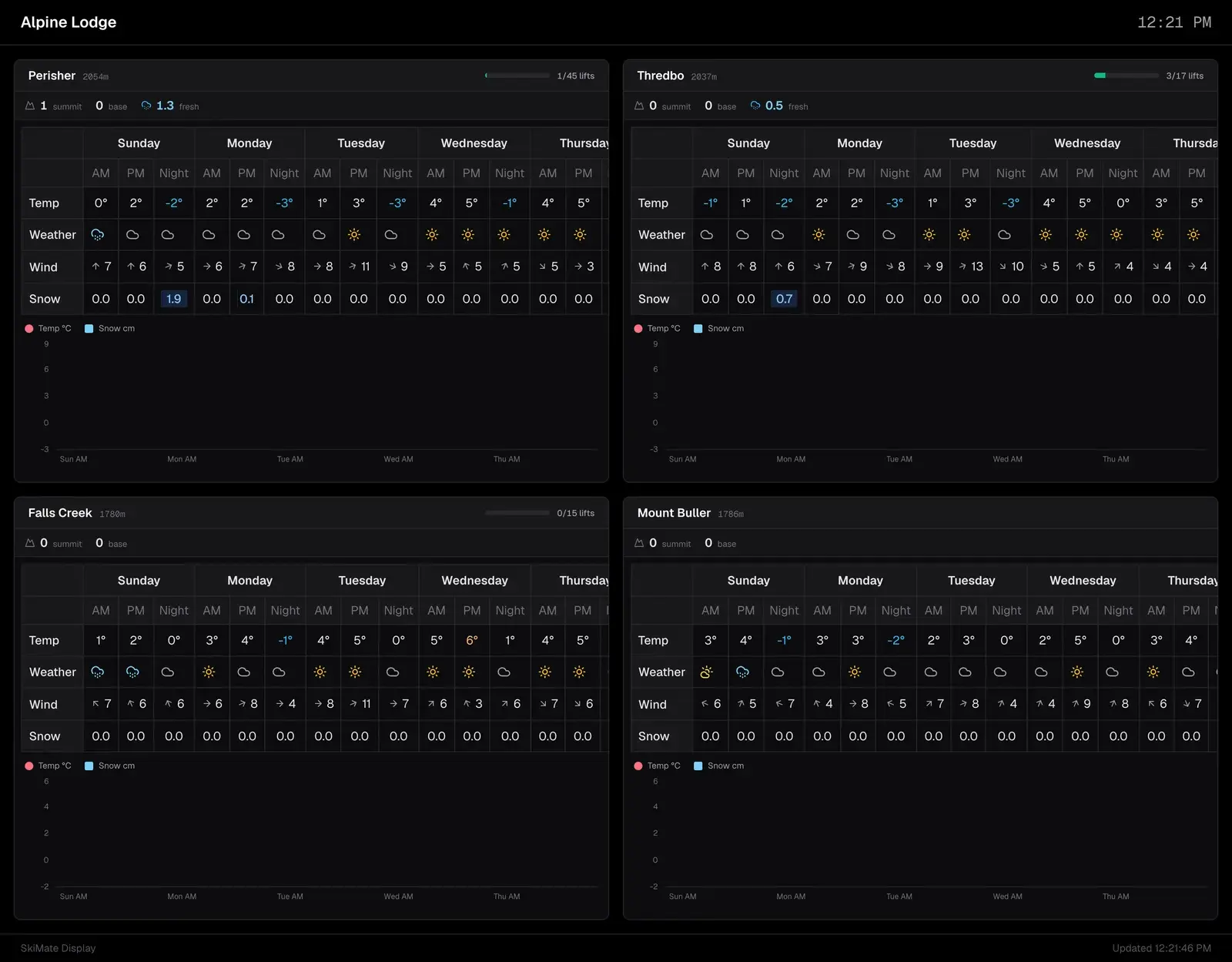
5-Day Forecast Grid
Snow-forecast style table with AM/PM/Night breakdown per day
Temperature, wind speed and direction, snowfall, and weather conditions, all at a glance for each resort you configure.
Multi-Resort Support
Show up to 10 resorts on a single display
Perfect for hotels near multiple ski areas, or ski shops that serve a whole region. Browse every resort SkiMate tracks and add the ones your guests care about.
Auto-Refresh
Data updates automatically every 5 minutes (configurable)
Set it and forget it. The display keeps itself current without any manual intervention.
Boards can also show current lift status and snow depth per resort, so guests can see how much of the mountain is open before they pull their boots on.
How do I set up a lobby forecast board?
- Create a display at /display. Give it a name like "Lobby TV Main".
- Add resorts: search and select the resorts your guests care about.
- Configure fields: choose which data points to show, such as temperature, wind, snow, and lift status.
- Set the layout: pick columns, a dark or light theme, and whether to show a clock.
- Open the URL: each display gets a unique address like
/d/abc123that you can fullscreen on any browser.
That's it. Point a TV at the URL, press F11, and your lobby now has a live forecast wall.
Where do people use Display View?
- Hotel lobbies: a morning forecast for guests planning their day
- Ski shop windows: live conditions that pull in passersby
- Resort operations: an internal dashboard for patrol and grooming teams
- Chalet living rooms: an ambient conditions display for guests
- Tour operator offices: real-time conditions for multiple destinations
If a guest wants to go deeper than the board, point them to a full resort profile or the week's trending conditions on their phone.
Dark and light themes
Display View supports both dark and light themes. Dark works best on modern displays and in dimly lit lobbies. Light is better for bright environments and window-facing screens.
What's next
We're working on more display features:
- Webcam feeds: embed live resort cameras
- Custom branding: add your hotel logo and colors
- Alert banners: highlight extreme weather or powder days
Get started
Display View is available now for all SkiMate users. Head to /display to create your first display. New to SkiMate? The complete guide to what SkiMate can do is a good place to start.
For the best lobby TV experience, use a device with Chrome or Edge, open the display URL, and press F11 for fullscreen. The display auto-refreshes and keeps itself up to date.
Frequently asked questions
Is Display View free to use?
Yes. Display View is available to every SkiMate user at no extra cost. You create a board, open its URL, and put it on any screen.
How many resorts can one board show?
A single display can show up to 10 resorts in a grid, or rotate through them one at a time. Most venues show the two or three mountains their guests actually ski.
Do guests need to log in to see the board?
No. Each board lives at its own public URL with no login and no SkiMate branding, so you can leave it running on a lobby TV or shop window indefinitely.
Which browser works best on a lobby TV?
Chrome or Edge in fullscreen mode, which you start by pressing F11, is the most reliable. Point the browser at your display URL and the board refreshes itself every few minutes.